日志集中管理平台ELK介绍安装配置及优化完全手册
简介
在我们日常生活中,我们经常需要回顾以前发生的一些事情;或者,当出现了一些问题的时候,可以从某些地方去查找原因,寻找发生问题的痕迹。无可避免需要用到文字的、图像的等等不同形式的记录。用计算机的术语表达,就是 LOG,或日志。
日志,对于任何系统来说都是及其重要的组成部分。在计算机系统里面,更是如此。但是由于现在的计算机系统大多比较复杂,很多系统都不是在一个地方,甚至都是跨国界的;即使是在一个地方的系统,也有不同的来源,比如,操作系统,应用服务,业务逻辑等等。他们都在不停产生各种各样的日志数据。
面对如此海量的数据,又是分布在各个不同地方,如果我们需要去查找一些重要的信息,难道还是使用传统的方法,去登陆到一台台机器上查看?看来传统的工具和方法已经显得非常笨拙和低效了。于是,一些聪明人就提出了建立一套集中式的方法,把不同来源的数据集中整合到一个地方。
一个完整的集中式日志系统,是离不开以下几个主要特点的。
收集-能够采集多种来源的日志数据
传输-能够稳定的把日志数据传输到中央系统
存储-如何存储日志数据
分析-可以支持 UI 分析
警告-能够提供错误报告,监控机制
ELK 协议栈介绍及体系结构
网络架构
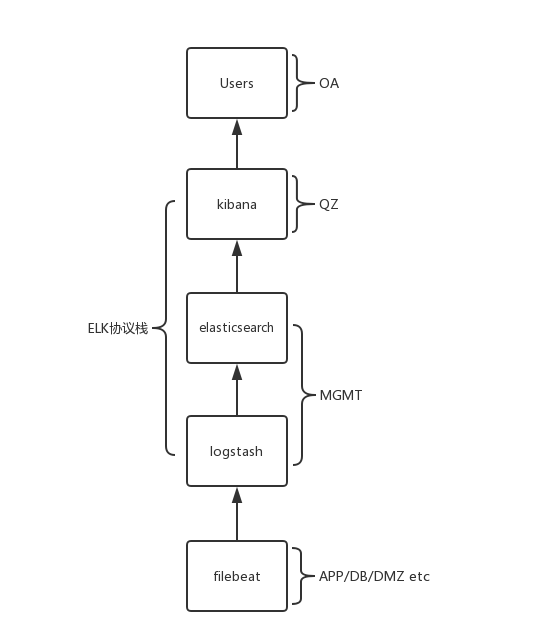
集群架构
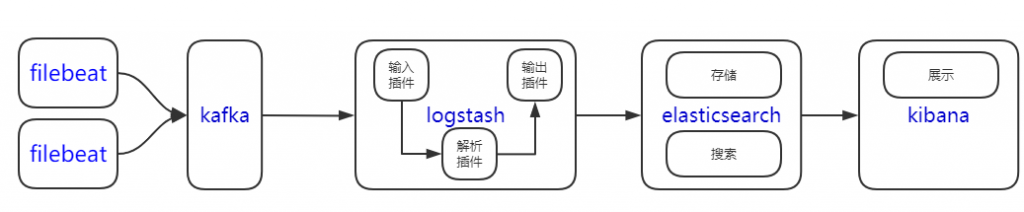
各组件简介
- Elasticsearch
Elasticsearch 是一个实时的分布式搜索和分析引擎,它可以用于全文搜索,结构化搜索以及分析 -
Logstash
数据收集引擎。它支持动态的从各种数据源搜集数据,并对数据进行过滤、分析、丰富、统一格式等操作 -
Kibana
数据查询、分析和可视化Web平台。 -
Filebeat
轻量级日志采集器
硬件配置及节点角色
- elasticsearch, hot and cold nodes
- kibana as elasticsearch master node
- logstash
| 主机名 | IP | 节点角色 | CPU | Memory |
|---|---|---|---|---|
| elasticsearch-10-30-120-21-prd | 10.30.120.21 | hot node | 8 | 32 |
| elasticsearch-10-30-120-22-prd | 10.30.120.22 | hot node | 8 | 32 |
| elasticsearch-10-30-120-23-prd | 10.30.120.23 | hot node | 8 | 32 |
| elasticsearch-10-30-120-24-prd | 10.30.120.24 | hot node | 4 | 32 |
| elasticsearch-10-30-120-25-prd | 10.30.120.25 | hot node | 4 | 32 |
| elasticsearch-10-30-120-26-prd | 10.30.120.26 | hot node | 4 | 32 |
| elasticsearch-10-30-120-30-prd | 10.30.120.30 | cold node | 8 | 32 |
| elasticsearch-10-30-120-31-prd | 10.30.120.31 | cold node | 8 | 32 |
| elasticsearch-10-30-120-32-prd | 10.30.120.32 | cold node | 8 | 32 |
| kibana-10-30-41-140-prd | 10.30.41.140 | master node | 2 | 8 |
| kibana-10-30-40-52-prd | 10.30.40.52 | master node | 2 | 8 |
| kibana-10-30-40-207-prd | 10.30.40.207 | master node | 2 | 8 |
| logstash-10-30-120-15-prd | 10.30.120.15 | 4 | 8 | |
| logstash-10-30-120-16-prd | 10.30.120.16 | 4 | 8 |
| cluster | VIP | 域名 |
|---|---|---|
| elasticsearch | 10.30.121.160 | elasticsearch.app.dsfdc.com |
| kibana | 10.30.40.181 | elk.dashuf.com |
ELK 安装
安装文件
[root@DS046010 5.6-install_packages]# pwd
/sysinit/elk/5.6-install_packages
logstash-5.6.3.tar.gz
elasticsearch-5.6.3.tar.gz
kibana-5.6.3-linux-x86_64.tar.gz
安装路径
解压至目的地
/wls/elk/elasticsearch
/wls/elk/logstash
/wls/elk/kibana
配置文件
elasticsearch
修改jvm heap size 为物理内存一半
/wls/elk/elasticsearch/config/jvm.options
-Xms16g
-Xmx16g
注意冷热数据节点分离配置不同的box_type属性: (node.attr.box_type: cold)
/wls/elk/elasticsearch/config/elasticsearch.yml
# ======================== Elasticsearch Configuration =========================
#
# NOTE: Elasticsearch comes with reasonable defaults for most settings.
#       Before you set out to tweak and tune the configuration, make sure you
#       understand what are you trying to accomplish and the consequences.
#
# The primary way of configuring a node is via this file. This template lists
# the most important settings you may want to configure for a production cluster.
#
# Please consult the documentation for further information on configuration options:
# https://www.elastic.co/guide/en/elasticsearch/reference/index.html
#
# ---------------------------------- Cluster -----------------------------------
#
# Use a descriptive name for your cluster:
#
cluster.name: elasticsearch-elk
#
# ------------------------------------ Node ------------------------------------
#
# Use a descriptive name for the node:
#
node.name: node1
node.data: true
node.master: false
node.ingest: true
#
# Add custom attributes to the node:
#
#node.attr.rack: r1
#
# ----------------------------------- Paths ------------------------------------
#
# Path to directory where to store the data (separate multiple locations by comma):
#
path.data: /wls/esdata, /esdata01
#
# Path to log files:
#
path.logs: /wls/eslog
#
# ----------------------------------- Memory -----------------------------------
#
# Lock the memory on startup:
#
#bootstrap.memory_lock: true
#
# Make sure that the heap size is set to about half the memory available
# on the system and that the owner of the process is allowed to use this
# limit.
#
# Elasticsearch performs poorly when the system is swapping the memory.
#
# ---------------------------------- Network -----------------------------------
#
# Set the bind address to a specific IP (IPv4 or IPv6):
#
network.host: 10.30.120.21
#
# Set a custom port for HTTP:
#
#http.port: 9200
#
# For more information, consult the network module documentation.
#
# --------------------------------- Discovery ----------------------------------
#
# Pass an initial list of hosts to perform discovery when new node is started:
# The default list of hosts is ["127.0.0.1", "[::1]"]
#
discovery.zen.ping.unicast.hosts: ["10.30.120.21", "10.30.120.22", "10.30.120.23", "10.30.120.24", "10.30.120.25", "10.30.120.26", "10.30.41.140", "10.30.40.52", "10.30.40.207", "10.30.120.30", "10.30.120.31", "10.30.120.32"]
discovery.zen.minimum_master_nodes: 2
#
# Prevent the "split brain" by configuring the majority of nodes (total number of master-eligible nodes / 2 + 1):
#
#discovery.zen.minimum_master_nodes: 3
#
# For more information, consult the zen discovery module documentation.
#
# ---------------------------------- Gateway -----------------------------------
#
# Block initial recovery after a full cluster restart until N nodes are started:
#
#gateway.recover_after_nodes: 3
#
# For more information, consult the gateway module documentation.
#
# ---------------------------------- Various -----------------------------------
#
# Require explicit names when deleting indices:
#
#action.destructive_requires_name: true
node.attr.box_type: hot
index.codec: best_compression
logstash
修改jvm heap size 为物理内存一半
/wls/elk/logstash/config/jvm.options
-Xms4g
-Xmx4g
logstash 解析日志的核心配置
/wls/elk/logstash/conf.d
::::::::::::::
02-beats-input.conf
::::::::::::::
input {
  beats {
    port => 5044
    # ssl => true
    # ssl_certificate => "/etc/pki/tls/certs/logstash-forwarder.crt"
    # ssl_key => "/etc/pki/tls/private/logstash-forwarder.key"
  }
}
::::::::::::::
10-syslog-filter.conf
::::::::::::::
filter {
  if [type] == "syslog" {
    grok {
      match => { "message" => "%{SYSLOGTIMESTAMP:syslog_timestamp} %{SYSLOGHOST:syslog_hostname} %{DATA:syslo
g_program}(?:\[%{POSINT:syslog_pid}\])?: %{GREEDYDATA:syslog_message}" }
    }
  }
}
::::::::::::::
11-haproxylog.conf
::::::::::::::
filter {
  if [type] == "haproxylog" {
    grok {
      match => { "message" => "%{HAPROXYTCP}" }
    }
    geoip {
      source => "client_ip"
      target => "geoip"
      # database => "/wls/wls81/elk/logstash-5.5.1/GeoLiteCity.dat"
      # add_field => [ "[geoip][coordinates]", "%{[geoip][longitude]}" ]
      # add_field => [ "[geoip][coordinates]", "%{[geoip][latitude]}"  ]
      fields => ["city_name", "country_code2", "country_name", "latitude", "longitude", "region_name"]
      remove_field => ["[geoip][latitude]", "[geoip][longitude]"]
    }
    mutate {
      split => [ "upstreamtime", "," ]
    }

    mutate {
      convert => [ "[geoip][location]", "float"]
      # convert => [ "[geoip][coordinates]", "float"]
    }
  }
}
::::::::::::::
12-apacheAccessLog.conf
::::::::::::::
filter {
  if [type] == "apacheAccessLog" {
    grok {
      match => { "message" => "%{COMBINEDAPACHELOG}" }
    }
  }
}
::::::::::::::
13-apacheErrorLog.conf
::::::::::::::
filter {
  if [type] == "apacheErrorLog" {
    grok {
      match => { "message" => "%{HTTPD_ERRORLOG}" }
    }
  }
}
::::::::::::::
14-squidAccessLog.conf
::::::::::::::
filter {
  if [type] == "squidAccessLog" {
    grok {
      match => { "message" => "%{NUMBER:timestamp}\s+%{NUMBER:duration}\s%{IP:client_address}\s%{WORD:cache_r
esult}/%{POSINT:status_code}\s%{NUMBER:bytes}\s%{WORD:request_method}\s%{NOTSPACE:url}\s(%{NOTSPACE:user}|-)\
s%{WORD:hierarchy_code}/%{IPORHOST:server}\s%{NOTSPACE:content_type}" }
    }
  }
}
::::::::::::::
15-gitlabRailsLog
::::::::::::::

filter {
  if [type] == "gitlabRailsLog" {
    grok {
      patterns_dir => ["./patterns"]
      match => { "message" => "%{RAILS3}" }
    }
  }
}
::::::::::::::
16-mailLog.conf
::::::::::::::
filter {
  if [type] == "mailLog" {
    grok {
      patterns_dir => ["./patterns"]
      match => { "message" => "%{DOVECOT}" }
      match => { "message" => "%{POSTFIX-ALL}" }
    }
  }
}
::::::::::::::
17-nginx-access.conf
::::::::::::::
#
filter {
  if [type] == "nginxAccessLog" {
    grok {
      match => { "message" => "%{NGINXACCESS}" }
    }
  }
}
::::::::::::::
18-network-switch.conf
::::::::::::::
filter {
  if [type] == "networkSwitch" {
    grok {
      match => { "message" => "%{CISCOTIMESTAMP}%{SPACE}%{CISCOTAG}%{SPACE}%{HOUR}: %{MINUTE}:%{SECOND}%{GREE
DYDATA}" }
    }
  }
}
::::::::::::::
20-weblogic-out-log.conf
::::::::::::::
filter {
  if [type] == "weblogiclog" {
    grok {
      match => { "message" => "\A\[%{WORD:logLevel}]%{YEAR}/%{MONTHDAY}/%{MONTHDAY}%{SPACE}%{TIME}%{SPACE}:%{
SPACE}%{NUMBER:duration}%{SPACE}%{GREEDYDATA}" }
      match => { "message" => "\A%{YEAR}-%{MONTHDAY}-%{MONTHDAY}%{SPACE}%{TIME}%{SPACE}%{NUMBER:duration}%{SP
ACE}-%{SPACE}%{NUMBER:bytes}%{SPACE}%{IP:client_ip}%{SPACE}%{URIHOST:server}%{SPACE}%{NUMBER:status}%{SPACE}%
{WORD:method}%{SPACE}%{URIPATH}%{SPACE}%{URIPATH}%{SPACE}%{GREEDYDATA}" }
    }
  }
}
::::::::::::::
21-businessEmailLog.conf
::::::::::::::
filter {
  if [type] == "businessEmailLog" {
    grok {
      match => { "message" => "%{TIME}%{SPACE}%{WORD:logLevel}%{SPACE}\[]%{SPACE}%{GREEDYDATA:applog}" }
    }
  }
}

::::::::::::::
22-microServiceLog.conf
::::::::::::::
filter {
  if [type] == "microServiceLog" {
    grok {
      match => { "message" => "\A%{TIME}%{SPACE}%{WORD:logLevel}%{SPACE}%{NOTSPACE}%{SPACE}%{NOTSPACE:javaCla
ssMethod}%{SPACE}%{JAVALOGMESSAGE}" }
    }
  }
}

::::::::::::::
30-elasticsearch-output.conf
::::::::::::::
output {
  elasticsearch {
    hosts => ["elasticsearch.app.dsfdc.com:9200"]
    sniffing => true
    manage_template => false
    index => "%{[@metadata][beat]}-%{+YYYY.MM.dd}"
    document_type => "%{[@metadata][type]}"
  }
}
正则表达式自定义pattern
/wls/elk/logstash/patterns
::::::::::::::
customPatterns
::::::::::::::
# postfix
POSTFIX_QUEUEID [0-9A-F]{10,11}

# rails
# rails controller with action
RCONTROLLER (?<controller>[^#]+)#(?<action>\w+)

# this will often be the only line:
RAILS3HEAD (?m)Started %{WORD:verb} "%{URIPATHPARAM:request}" for %{IPORHOST:clientip} at (?<timestamp>%{YEAR
}-%{MONTHNUM}-%{MONTHDAY} %{HOUR}:%{MINUTE}:%{SECOND} %{ISO8601_TIMEZONE})
# for some a strange reason, params are stripped of {} - not sure that's a good idea.
RPROCESSING \W*Processing by %{RCONTROLLER} as (?<format>\S+)(?:\W*Parameters: {%{DATA:params}}\W*)?
RAILS3FOOT Completed %{NUMBER:response}%{DATA} in %{NUMBER:totalms}ms %{RAILS3PROFILE}%{GREEDYDATA}
RAILS3PROFILE (?:\(Views: %{NUMBER:viewms}ms \| ActiveRecord: %{NUMBER:activerecordms}ms|\(ActiveRecord: %{NU
MBER:activerecordms}ms)?

# putting it all together
RAILS3 %{RAILS3HEAD}(?:%{RPROCESSING})?(?<context>(?:%{DATA}\n)*)(?:%{RAILS3FOOT})?

# Pattern: Nginx
#NGINXACCESS %{IPORHOST:clientip} %{USERNAME:ident} %{USERNAME:auth} \[%{HTTPDATE:timestamp}\] "%{WORD:verb}
%{URIPATHPARAM:request} HTTP/%{NUMBER:httpversion}" %{NUMBER:response} (?:%{NUMBER:bytes}|-) (?:"(?:%{URI:ref
errer}|-)"|%{QS:referrer}) %{QS:agent}


# https://gist.github.com/TinLe/f9763ac68c122cd11b91
#syslog stuff
COMPONENT ([\w._\/%-]+)
COMPID postfix\/%{COMPONENT:component}(?:\[%{NUMBER:pid}\])?
POSTFIX (?:%{SYSLOGTIMESTAMP:timestamp}|%{TIMESTAMP_ISO8601:timestamp8601}) (?:%{SYSLOGFACILITY} )?%{SYSLOGHO
ST:logsource} %{COMPID}:

# Milter
HELO (?:\[%{IP:helo}\]|%{HOST:helo}|%{DATA:helo})

MILTERCONNECT %{QUEUEID:qid}: milter-reject: CONNECT from %{RELAY:relay}: %{GREEDYDATA:milter_reason}; proto=
%{WORD:proto}
MILTERUNKNOWN %{QUEUEID:qid}: milter-reject: UNKNOWN from %{RELAY:relay}: %{GREEDYDATA:milter_reason}; proto=
%{WORD:proto}
MILTEREHLO %{QUEUEID:qid}: milter-reject: EHLO from %{RELAY:relay}: %{GREEDYDATA:milter_reason}; proto=%{WORD
:proto} helo=<%{HELO}>
MILTERMAIL %{QUEUEID:qid}: milter-reject: MAIL from %{RELAY:relay}: %{GREEDYDATA:milter_reason}; from=<%{EMAI
LADDRESS:from}> proto=%{WORD:proto} helo=<%{HELO}>
MILTERHELO %{QUEUEID:qid}: milter-reject: HELO from %{RELAY:relay}: %{GREEDYDATA:milter_reason}; proto=%{WORD
:proto} helo=<%{HELO}>
MILTERRCPT %{QUEUEID:qid}: milter-reject: RCPT from %{RELAY:relay}: %{GREEDYDATA:milter_reason}; from=<%{EMAI
LADDRESS:from}> to=<%{EMAILADDRESS:to}> proto=%{WORD:proto} helo=<%{HELO}>
MILTERENDOFMESSAGE %{QUEUEID:qid}: milter-reject: END-OF-MESSAGE from %{RELAY:relay}: %{GREEDYDATA:milter_rea
son}; from=<%{EMAILADDRESS:from}> to=<%{EMAILADDRESS:to}> proto=%{WORD:proto} helo=<%{HELO}>

# Postfix stuff
HELO (?:\[%{IP:helo}\]|%{HOST:helo}|%{DATA:helo})
QUEUEID (?:[A-F0-9]+|NOQUEUE)
EMAILADDRESSPART [a-zA-Z0-9_.+-=:~]+
EMAILADDRESS %{EMAILADDRESSPART:local}@%{EMAILADDRESSPART:remote}
RELAY (?:%{HOSTNAME:relayhost}(?:\[%{IP:relayip}\](?::[0-9]+(.[0-9]+)?)?)?)
POSREAL [0-9]+(.[0-9]+)?
DSN %{NONNEGINT}.%{NONNEGINT}.%{NONNEGINT}
STATUS sent|deferred|bounced|expired
PERMERROR 5[0-9]{2}
MESSAGELEVEL reject|warning|error|fatal|panic

POSTFIXSMTPMESSAGE %{MESSAGELEVEL}: %{GREEDYDATA:reason}
POSTFIXACTION discard|dunno|filter|hold|ignore|info|prepend|redirect|replace|reject|warn

# postfix/smtp and postfix/lmtp, postfix/local and postfix/error
POSTFIXSMTP %{POSTFIXSMTPRELAY}|%{POSTFIXSMTPCONNECT}|%{POSTFIXSMTP5XX}|%{POSTFIXSMTPREFUSAL}|%{POSTFIXSMTPLO
STCONNECTION}|%{POSTFIXSMTPTIMEOUT}
POSTFIXSMTPRELAY %{QUEUEID:qid}: to=<%{DATA:to}>,(?:\sorig_to=<%{DATA:orig_to}>,)? relay=%{RELAY},(?: delay=%
{POSREAL:delay},)?(?: delays=%{DATA:delays}?,)?(?: conn_use=%{POSREAL:conn_use},)?( %{WORD}=%{DATA},)+? dsn=%
{DSN:dsn}, status=%{STATUS:result} %{GREEDYDATA:reason}
POSTFIXSMTPCONNECT connect to %{RELAY}: %{GREEDYDATA:reason}
POSTFIXSMTP5XX %{QUEUEID:qid}: to=<%{EMAILADDRESS:to}>,(?:\sorig_to=<%{EMAILADDRESS:orig_to}>,)? relay=%{RELA
Y}, (%{WORD}=%{DATA},)+ dsn=%{DSN:dsn}, status=%{STATUS:result} \(host %{HOSTNAME}\[%{IP}\] said: %{PERMERROR
:responsecode} %{DATA:smtp_response} \(in reply to %{DATA:command} command\)\)
POSTFIXSMTPREFUSAL %{QUEUEID:qid}: host %{RELAY} refused to talk to me: %{GREEDYDATA:reason}
POSTFIXSMTPLOSTCONNECTION %{QUEUEID:qid}: lost connection with %{RELAY} while %{GREEDYDATA:reason}
POSTFIXSMTPTIMEOUT %{QUEUEID:qid}: conversation with %{RELAY} timed out while %{GREEDYDATA:reason}

# postfix/smtpd
POSTFIXSMTPD %{POSTFIXSMTPDCONNECTS}|%{POSTFIXSMTPDMILTER}|%{POSTFIXSMTPDACTIONS}|%{POSTFIXSMTPDTIMEOUTS}|%{P
OSTFIXSMTPDLOGIN}|%{POSTFIXSMTPDCLIENT}|%{POSTFIXSMTPDNOQUEUE}|%{POSTFIXSMTPDWARNING}|%{POSTFIXSMTPDLOSTCONNE
CTION}
POSTFIXSMTPDCONNECTS (?:dis)?connect from %{RELAY}
POSTFIXSMTPDMILTER %{MILTERCONNECT}|%{MILTERUNKNOWN}|%{MILTEREHLO}|%{MILTERMAIL}|%{MILTERHELO}|%{MILTERRCPT}
POSTFIXSMTPDACTIONS %{QUEUEID:qid}: %{POSTFIXACTION:postfix_action}: %{DATA:command} from %{RELAY}: %{PERMERR
OR:responsecode} %{DSN:dsn} %{DATA}: %{DATA:reason}; from=<%{EMAILADDRESS:from}> to=<%{EMAILADDRESS:to}> prot
o=%{DATA:proto} helo=<%{HELO}>
POSTFIXSMTPDTIMEOUTS timeout after %{DATA:command} from %{RELAY}
POSTFIXSMTPDLOGIN %{QUEUEID:qid}: client=%{DATA:client}, sasl_method=%{DATA:saslmethod}, sasl_username=%{GREE
DYDATA:saslusername}
POSTFIXSMTPDCLIENT %{QUEUEID:qid}: client=%{GREEDYDATA:client}
POSTFIXSMTPDNOQUEUE NOQUEUE: %{POSTFIXACTION:postfix_action}: %{DATA:command} from %{RELAY}: %{GREEDYDATA:rea
son}
POSTFIXSMTPDWARNING warning:( %{IP}: | hostname %{HOSTNAME} )?%{GREEDYDATA:reason}
POSTFIXSMTPDLOSTCONNECTION (?:lost connection after %{DATA:smtp_response} from %{RELAY}|improper command pipe
lining after HELO from %{GREEDYDATA:reason})

# postfix/cleanup
POSTFIXCLEANUP %{POSTFIXCLEANUPMESSAGE}|%{POSTFIXCLEANUPMILTER}
POSTFIXCLEANUPMESSAGE %{QUEUEID:qid}: (resent-)?message-id=(<)?%{GREEDYDATA:messageid}(>)?
POSTFIXCLEANUPMILTER %{MILTERENDOFMESSAGE}

# postfix/bounce
POSTFIXBOUNCE %{QUEUEID:qid}: sender (non-)?delivery( status)? notification: %{QUEUEID:bouncequeueid}

# postfix/qmgr and postfix/pickup
POSTFIXQMGR %{QUEUEID:qid}: (?:removed|from=<(?:%{DATA:from})?>(?:, size=%{NUMBER:size}, nrcpt=%{NUMBER:nrcpt
} \(%{GREEDYDATA:queuestatus}\))?)

# postfix/anvil
POSTFIXANVIL statistics: %{GREEDYDATA:reason}

# postfix/trivial-rewrite
POSTFIXREWRITE warning: do not list domain %{DATA:domain} in BOTH mydestination and virtual_alias_domains

# Dovecot
DOVEIMAP imap\(%{DATA:user}\): %{DATA:reason} in=%{NUMBER:inbytes} out=%{NUMBER:outbytes}
DOVECMD anvil|auth|config|log|master
DOVEMISC %{DOVECMD:command}: %{GREEDYDATA:reason}
DOVELOGIN imap-login: %{DATA:action}:(?: user=<(%{DATA:user})?>, (method=%{DATA:loginmethod}, )?rip=%{IP:rip}
, lip=%{IP:lip},( mpid=%{NUMBER:mpid},( %{DATA:sectype},)?| %{DATA:securesession},)? session=<%{DATA:session}
>| %{GREEDYDATA:reason})
DOVELDA lda\((%{DATA:user})?\):( %{DATA:action}:)? msgid=(?:<%{DATA:mesgid}@%{DATA:domain}>|%{DATA:mesgid}):(
 saved mail to| stored mail into mailbox) .*?%{DATA:folder}.*?
DOVEAUTH auth-worker\(%{NUMBER:pid}\): pam\((?:%{USERNAME:user}|%{EMAILADDRESS:user}),%{IP:ip}\): %{GREEDYDAT
A:reason}

# Dovecot wrap em up
DOVECOT (?:%{SYSLOGTIMESTAMP:timestamp}|%{TIMESTAMP_ISO8601:timestamp8601}) (?:%{SYSLOGFACILITY} )?%{SYSLOGHO
ST:logsource} dovecot: (%{DOVEIMAP}|%{DOVELOGIN}|%{DOVELDA}|%{DOVEAUTH}|%{DOVEMISC})

# Postfix wrap em up
POSTFIX-ALL %{POSTFIX} (?:%{POSTFIXSMTP}|%{POSTFIXANVIL}|%{POSTFIXQMGR}|%{POSTFIXBOUNCE}|%{POSTFIXCLEANUP}|%{
POSTFIXSMTPD}|%{POSTFIXREWRITE})

::::::::::::::
nginx
::::::::::::::
NGUSERNAME [a-zA-Z\.\@\-\+_%]+
NGUSER %{NGUSERNAME}
NGINXACCESS %{IPORHOST:clientip} %{NGUSER:ident} %{NGUSER:auth} \[%{HTTPDATE:timestamp}\] "%{WORD:verb} %{URI
PATHPARAM:request} HTTP/%{NUMBER:httpversion}" %{NUMBER:response} (?:%{NUMBER:bytes}|-) (?:"(?:%{URI:referrer
}|-)"|%{QS:referrer}) %{QS:agent}
kibana
- kibana.yml
/wls/elk/kibana/config/kibana.yml
修改对应的配置:
server.host: "10.30.40.207"
elasticsearch.url: "http://127.0.0.1:9200"
elasticsearch.requestTimeout: 300000
- kibana 作为master 节点,安装及配置elasticsearch
修改jvm heap size
/wls/elk/elasticsearch/config/jvm.options
-Xms2g
-Xmx2g
The master node is responsible for lightweight cluster-wide actions such as creating or deleting an index, tracking which nodes are part of the cluster, and deciding which shards to allocate to which nodes. It is important for cluster health to have a stable master node.
/wls/elk/elasticsearch/config/elasticsearch.yml
cluster.name: elasticsearch-elk
node.name: node-10.30.40.207
node.master: true
node.data: false
node.ingest: false
path.data: /wls/esdata
path.logs: /wls/eslog
network.host: 10.30.40.207
discovery.zen.ping.unicast.hosts: ["10.30.120.21", "10.30.120.22", "10.30.120.23", "10.30.120.24", "10.30.120.25", "10.30.120.26", "10.30.41.140", "10.30.40.52", "10.30.40.207", "10.30.120.30", "10.30.120.31", "10.30.120.32"]
discovery.zen.minimum_master_nodes: 2
- 安装及配置nginx
yum -y install nginx
/etc/nginx/nginx.conf
user nginx;
worker_processes auto;
error_log /var/log/nginx/error.log;
pid /run/nginx.pid;

# Load dynamic modules. See /usr/share/nginx/README.dynamic.
include /usr/share/nginx/modules/*.conf;

events {
    worker_connections 1024;
}

http {
    log_format  main  '$remote_addr - $remote_user [$time_local] "$request" '
                      '$status $body_bytes_sent "$http_referer" '
                      '"$http_user_agent" "$http_x_forwarded_for"';

    access_log  /var/log/nginx/access.log  main;

    sendfile            on;
    tcp_nopush          on;
    tcp_nodelay         on;
    keepalive_timeout   65;
    types_hash_max_size 2048;

    include             /etc/nginx/mime.types;
    default_type        application/octet-stream;

    # Load modular configuration files from the /etc/nginx/conf.d directory.
    # See http://nginx.org/en/docs/ngx_core_module.html#include
    # for more information.
    include /etc/nginx/conf.d/*.conf;

    upstream kibanaServer {
      # ip_hash;
      server 10.30.41.140:5601;
      server 10.30.40.52:5601;
      server 10.30.40.207:5601;
    }

    upstream elasticsearchLoadBalancer {
      # ip_hash;
      server 10.30.41.140:9200;
      server 10.30.40.52:9200;
      server 10.30.40.207:9200;
    }

    server {
        listen       80 default;
        server_name  elk;
        root         /usr/share/nginx/html;

        # Load configuration files for the default server block.
        include /etc/nginx/default.d/*.conf;

#       auth_basic "Restricted Access";
#       auth_basic_user_file /etc/nginx/htpasswd.users;

        location / {
          proxy_pass http://kibanaServer;
          proxy_set_header   Host             $host;
          proxy_set_header   X-Real-IP        $remote_addr;
          proxy_set_header   X-Forwarded-For  $proxy_add_x_forwarded_for;
        }

        location /es/ {
          proxy_pass http://elasticsearchLoadBalancer/;
        }

    }
    server {
        listen       127.0.0.1:9200;
        server_name  rocky;
        root         /usr/share/nginx/html;

        location / {
          proxy_pass http://elasticsearchLoadBalancer;
        }
    }
}
ELK 启动
使用wls81 用户启动应用。
上传启动脚本
elasticsearch
::::::::::::::
startELK.sh
::::::::::::::
#!/bin/bash
# Rocky
# start  elasticsearch
PATH=/usr/local/bin:/bin:/usr/bin:/usr/local/sbin:/usr/sbin:/wls/wls81/.local/bin:/wls/wls81/bin:/wls/jdk1.8.0_91//bin
cd /wls/elk/
array=(9200)
len=${#array[*]}
i=0
while [ $i -lt $len ]; do
  numberOfElk=$(ss -tlnp | grep -c ${array[$i]})
  case ${array[$i]} in
    9200)
    [ $numberOfElk -eq 0 ] && echo "Starting elasticsearch..." && elasticsearch/bin/elasticsearch -d && exit 0;;
  esac
  let i++
done
::::::::::::::
stopELK.sh
::::::::::::::
#!/bin/bash
# Rocky
# stop  kibana logstash elasticsearch
# PID of kibana logstash elasticsearch
array=(5601 5044 9200)
len=${#array[*]}
i=0
while [ $i -lt $len ]; do
  PID=$(ss -tlnp | grep ${array[$i]} | egrep -o 'pid=[0-9]+' | sed -e 's/pid=//')

  [ ! -z $PID ] && echo "Stopping $PID..." && kill $PID
  let i++
done
logstash
::::::::::::::
startELK.sh
::::::::::::::
#!/bin/bash
# Zhao Baolei
# start elk
# run as user:wls81
[ $(id | grep -c wls81) -ne 1 ] && echo "Please run as user wls81!" && exit 1

cd /wls/elk
logstash/bin/logstash -f logstash/conf.d --config.reload.automatic &
sleep 1
::::::::::::::
stopELK.sh
::::::::::::::
    #!/bin/bash
    # Rocky
    # stop  kibana logstash elasticsearch
    # PID of kibana logstash elasticsearch
    array=(5601 5044 9200)
    len=${#array[*]}
    i=0
    while [ $i -lt $len ]; do
      PID=$(ss -tlnp | grep ${array[$i]} | egrep -o 'pid=[0-9]+' | sed -e 's/pid=//')

      [ ! -z $PID ] && echo "Stopping $PID..." && kill $PID
      let i++
    done
kibana
::::::::::::::
startELK.sh
::::::::::::::
    #!/bin/bash
    # Rocky
    # start  kibana and elasticsearch
    PATH=/usr/local/bin:/bin:/usr/bin:/usr/local/sbin:/usr/sbin:/wls/wls81/.local/bin:/wls/wls81/bin:/wls/jdk1.8.
    0_91//bin
    cd /wls/elk/
    array=(5601 9200)
    len=${#array[*]}
    i=0
    while [ $i -lt $len ]; do
      numberOfElk=$(ss -tlnp | grep -c ${array[$i]})
      case ${array[$i]} in
        5601)
        [ $numberOfElk -eq 0 ] && echo "Starting kibana..." && kibana/bin/kibana &;;
        9200)
        [ $numberOfElk -lt 2 ] && echo "Starting elasticsearch..." && elasticsearch/bin/elasticsearch -d;;
      esac

      let i++
    done
::::::::::::::
stopELK.sh
::::::::::::::
    #!/bin/bash
    # Rocky
    # stop  kibana logstash elasticsearch
    # PID of kibana logstash elasticsearch
    array=(5601 5044 9200)
    len=${#array[*]}
    i=0
    while [ $i -lt $len ]; do
      PID=$(ss -tlnp | grep ${array[$i]} | egrep -o 'pid=[0-9]+' | sed -e 's/pid=//')

      [ ! -z $PID ] && echo "Stopping $PID..." && kill $PID
      let i++
    done
客户端安装filebeat
[chkusr@DS046010 5.6-install_packages]$ /sysinit/elk/5.6-install_packages/filebeat-5.6.3-x86_64.rpm
建议使用ansible 批量安装,这个安装文件适用与 CentOS 6、7
安装后使用 service/systemctl 启动,记得设置为开机自动启动
CentOS 5的安装文件 /sysinit/elk/beats/filebeat.5.5.tgz
filebeat配置文件
filebeat.yml
###################### Filebeat Configuration Example #########################

# This file is an example configuration file highlighting only the most common
# options. The filebeat.full.yml file from the same directory contains all the
# supported options with more comments. You can use it as a reference.
#
# You can find the full configuration reference here:
# https://www.elastic.co/guide/en/beats/filebeat/index.html

#=========================== Filebeat prospectors =============================

filebeat.prospectors:

# Each - is a prospector. Most options can be set at the prospector level, so
# you can use different prospectors for various configurations.
# Below are the prospector specific configurations.

# syslog
- input_type: log

  # Paths that should be crawled and fetched. Glob based paths.
  paths:
    - /var/log/secure
    - /var/log/messages
    # - /var/log/*.log
    # - c:\programdata\elasticsearch\logs\*
  document_type: syslog

# haproxylog
- input_type: log

  # Paths that should be crawled and fetched. Glob based paths.
  paths:
    - /wls/haproxy/logs/haproxy.log

  document_type: haproxylog

# apacheAccessLog
- input_type: log

  # Paths that should be crawled and fetched. Glob based paths.
  paths:
    - /var/log/httpd/access_log

  document_type: apacheAccessLog

# apacheErrorLog
- input_type: log

  # Paths that should be crawled and fetched. Glob based paths.
  paths:
    - /var/log/httpd/error_log

  document_type: apacheErrorLog

# squidAccessLog
- input_type: log

  # Paths that should be crawled and fetched. Glob based paths.
  paths:
    - /var/log/squid/access.log

  document_type: squidAccessLog

# gitlab-rails-production.log
- input_type: log

  # Paths that should be crawled and fetched. Glob based paths.
  paths:
    - /var/log/gitlab/gitlab-rails/production.log

  document_type: gitlabRailsLog

# nginxAccessLog
- input_type: log

  # Paths that should be crawled and fetched. Glob based paths.
  paths:
    - /var/log/nginx/access.log

  document_type: nginxAccessLog

# mailLog
- input_type: log

  # Paths that should be crawled and fetched. Glob based paths.
  paths:
    - /var/log/maillog

  document_type: mailLog

# weblogiclog
- input_type: log
  paths:
    - /wls/applogs/rtlog/*AppServer00*/*.out
    - /wls/applogs/rtlog/*AppServer00*/*.acc
  encoding: gbk
  document_type: weblogiclog

# # businessEmailLog
# - input_type: log
#   paths:
#     - /wls/applogs/BusinessEmail/spring.log
# #    - /wls/applogs/BusinessEmail/gc.log
# #  exclude_lines: [".* INFO  [] EmailUtil.receiveMail:\d+ query User ,user ="]
#   exclude_lines: [".* INFO  [] EmailUtil.receiveMail:[0-9]+ query User ,user ="]
#   document_type: businessEmailLog

# microServiceLog
- input_type: log
  paths:
    - /wls/applogs/*/spring.log
  exclude_lines: [".*AbstractCoordinator.*joining group"]
  exclude_lines: [".*AbstractCoordinator.*Successfully joined group"]
# businessEmailLog
  exclude_lines: [".* INFO  [] EmailUtil.receiveMail:[0-9]+ (begin close inbox|end close inbox|query User ,user =)"]
  #exclude_lines: [".*INFO  [] EmailUtil.receiveMail:[0-9]+ query User ,user ="]
  #exclude_lines: [".*INFO  [] EmailUtil.receiveMail:[0-9]+ (begin|end) close inbox"]
  document_type: microServiceLog

registry_file: /var/lib/filebeat/registry

  # Exclude lines. A list of regular expressions to match. It drops the lines that are
  # matching any regular expression from the list.
  #exclude_lines: ["^DBG"]

  # Include lines. A list of regular expressions to match. It exports the lines that are
  # matching any regular expression from the list.
  #include_lines: ["^ERR", "^WARN"]

  # Exclude files. A list of regular expressions to match. Filebeat drops the files that
  # are matching any regular expression from the list. By default, no files are dropped.
  #exclude_files: [".gz$"]

  # Optional additional fields. These field can be freely picked
  # to add additional information to the crawled log files for filtering
  #fields:
  #  level: debug
  #  review: 1

  ### Multiline options

  # Mutiline can be used for log messages spanning multiple lines. This is common
  # for Java Stack Traces or C-Line Continuation

  # The regexp Pattern that has to be matched. The example pattern matches all lines starting with [
  #multiline.pattern: ^\[

  # Defines if the pattern set under pattern should be negated or not. Default is false.
  #multiline.negate: false

  # Match can be set to "after" or "before". It is used to define if lines should be append to a pattern
  # that was (not) matched before or after or as long as a pattern is not matched based on negate.
  # Note: After is the equivalent to previous and before is the equivalent to to next in Logstash
  #multiline.match: after


#================================ General =====================================

# The name of the shipper that publishes the network data. It can be used to group
# all the transactions sent by a single shipper in the web interface.
#name:

# The tags of the shipper are included in their own field with each
# transaction published.
#tags: ["service-X", "web-tier"]

# Optional fields that you can specify to add additional information to the
# output.
#fields:
#  env: staging

#================================ Outputs =====================================

# Configure what outputs to use when sending the data collected by the beat.
# Multiple outputs may be used.

#-------------------------- Elasticsearch output ------------------------------
#output.elasticsearch:
  # Array of hosts to connect to.
  #hosts: ["localhost:9200"]

  # Optional protocol and basic auth credentials.
  #protocol: "https"
  #username: "elastic"
  #password: "changeme"

#----------------------------- Logstash output --------------------------------
output.logstash:
  # The Logstash hosts
  hosts: ["10.30.120.15:5044", "10.30.120.16:5044"]
  loadbalance: true

  # Optional SSL. By default is off.
  # Certificate for SSL client authentication
  # ssl.certificate_authorities: ["/etc/pki/tls/certs/logstash-forwarder.crt"]

  # Client Certificate Key
  #ssl.key: "/etc/pki/client/cert.key"

#================================ Logging =====================================

# Sets log level. The default log level is info.
# Available log levels are: critical, error, warning, info, debug
logging.level: warning

# At debug level, you can selectively enable logging only for some components.
# To enable all selectors use ["*"]. Examples of other selectors are "beat",
# "publish", "service".
#logging.selectors: ["*"]
优化
优化索引
可以使用kibana自带的Index Lifecycle Policies来管理索引,将旧的不常用的移到冷节点,或者更老的删除。
但我觉得这个不好用,于是写了脚本来管理索引。
对于不同的应用设置不同的保留时间(天数),过期的先关闭索引,然后删除。
关闭索引
# clse N days ago indices
# usage: closeIndex filebeat-easygo 5
closeIndex() {
index="$1"
keepdate=$2
oldDate=$(date -d "$keepdate day ago" +%Y.%m.%d)

curl -sS http://${ELKADDRESS}:9200/_cat/indices | grep -vE '^(health|.monitoring-|.kibana_)' | grep -w open | grep "$index" | sort -r | grep -A 100 "$oldDate"  | awk '{print $3}' | \
while read oldIndex; do
  if [ ! -z $oldIndex ]; then
    echo "# ----------  flush and close old index" >> $logFile
    echo "## flush $oldIndex" >> $logFile
    curl -sS -XPOST "http://${ELKADDRESS}:9200/$oldIndex/_flush" >> $logFile
    echo >> $logFile
    echo "## close $oldIndex" >> $logFile
    # curl -sS -XPOST "http://${ELKADDRESS}:9200/$oldIndex/_close?pretty" >> $logFile
    curl -sS -XPOST "http://${ELKADDRESS}:9200/$oldIndex/_close" >> $logFile
    echo -e "\n" >> $logFile
  fi
done
}
示例:
# close intelligent-hardwareplatform
closeIndex intelligent-hardwareplatform 10
# close ihw-gateway-access-log
closeIndex ihw-gateway-access-log 30
# you'd better write full index name otherwise may delete by mistake: grep filebeat
closeIndex filebeat-202[0-9] 5
删除索引
# delete closed indices
deleteIndex() {
curl -sS http://${ELKADDRESS}:9200/_cat/indices | grep -w close | awk '{print $3}' | \
while read oldIndex; do
  if [ ! -z $oldIndex ]; then
    echo "# ----------  delete old index" >> $logFile
    echo "## delete $oldIndex" >> $logFile
    curl -sS -XDELETE "http://${ELKADDRESS}:9200/$oldIndex" >> $logFile
    echo -e "\n" >> $logFile
  fi
done
}
修改索引
当磁盘可用率低时触发elasticsearch上水位时,索引会变为只读,新索引也无法写入。
当解决完磁盘空间后,需要修改索引属性为读写。
curl -sS http://${ELKADDRESS}:9200/_cat/indices | awk '{print $3}' | \
while read i; do
# read_only_allow_delete
READONLY=$(curl -sS -XGET "http://localhost:9200/${i}/_settings" | jq --compact-output --raw-output '.[].settings.index.blocks.read_only_allow_delete')
if [ $READONLY == "true" ]; then
echo "---------- change ${i} from READ ONLY to READ WRITE ---------- " | tee -a $logFile
curl -sS -XPUT "http://${ELKADDRESS}:9200/${i}/_settings"  -H 'Content-Type: application/json' -d'
{
  "index" : {
    "blocks" : {
      "read_only_allow_delete" : "false"
    }
  }
}' >> $logFile
echo -e "\n" >> $logFile
fi
done
其它优化
对索引进行merge,并将max_num_segments调成1,既能减少索引大小,又能提高查询效率。
_forcemerge?max_num_segments=1
优化是一个长期的过程,根据实际情况,不断做出调整。